Body - Fields
Just like Path and Query, you can use Pydantic's Field in Body to declare validation rules within a model and provide additional metadata. This allows you to define validation for request bodies more clearly in your API.
import Field
First, you have to import it:
from typing import Annotated

from nexify import Body, Nexify
from pydantic import BaseModel, Field

app = Nexify()


class Item(BaseModel):
    name: str
    description: Annotated[
        str | None,
        Field(
            default=None,
            description="The description of the item",
            max_length=300,
        ),
    ]
    price: Annotated[
        float,
        Field(
            gt=0,
            description="The price must be greater than zero",
        ),
    ]
    tax: Annotated[
        float | None,
        Field(
            default=None,
            gt=0,
        ),
    ]


@app.post("/items")
def create_item(item: Annotated[Item, Body()]):
    return item.model_dump()
Declaring Model Attributes
You can then use Field with model attributes:
from typing import Annotated

from nexify import Body, Nexify
from pydantic import BaseModel, Field

app = Nexify()


class Item(BaseModel):
    name: str
    description: Annotated[
        str | None,
        Field(
            default=None,
            description="The description of the item",
            max_length=300,
        ),
    ]
    price: Annotated[
        float,
        Field(
            gt=0,
            description="The price must be greater than zero",
        ),
    ]
    tax: Annotated[
        float | None,
        Field(
            default=None,
            gt=0,
        ),
    ]


@app.post("/items")
def create_item(item: Annotated[Item, Body()]):
    return item.model_dump()
You can use the same properties as in Path and Query, including:
gt,ge,lt,le: Constraints for numeric values (gt=0 means greater than 0, ge=0 means greater than or equal to 0)min_length,max_length: Constraints for string length (min_length=2, max_length=50)regex: String validation using regular expressions (regex="^[a-zA-Z0-9_-]+$")
In addition to these, various other options are available. For more details, refer to the Pydantic official documentation.
Adding Extra Information Using Body()
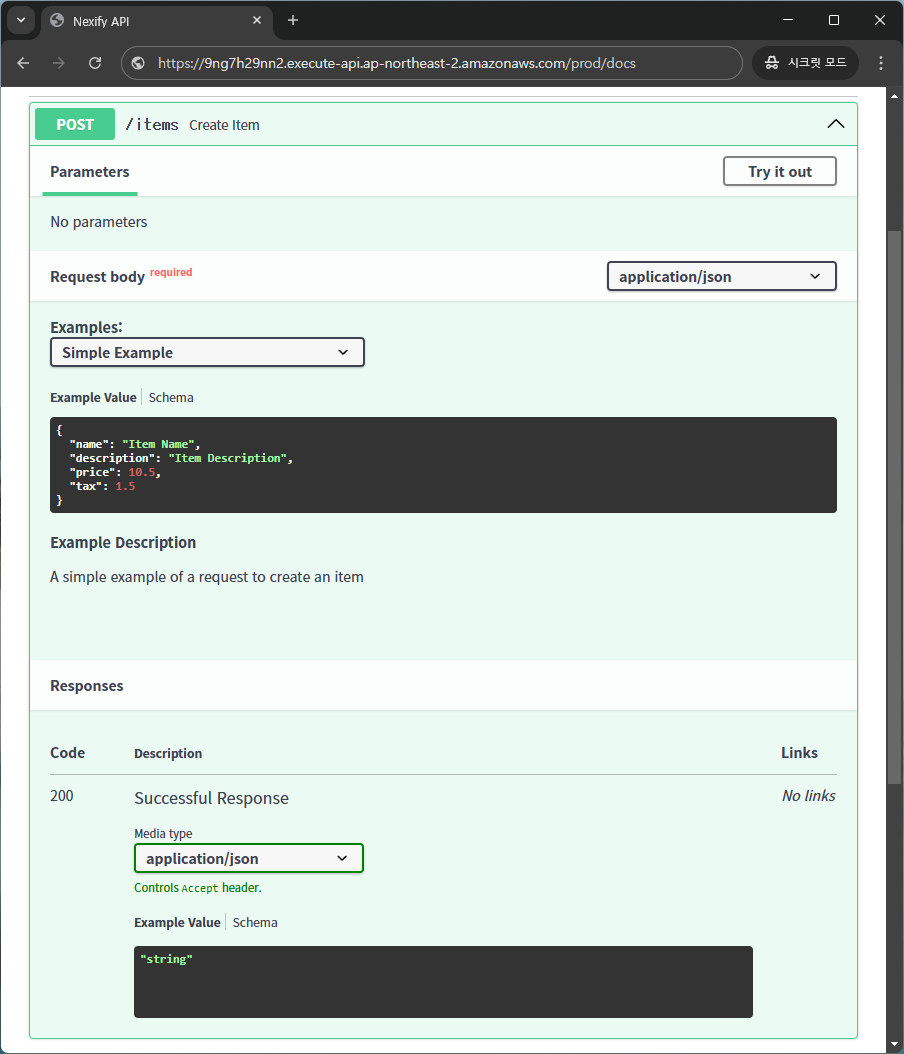
You can use openapi_examples inside Body() to define example values that will be displayed in the API documentation.
from typing import Annotated

from nexify import Body, Nexify
from pydantic import BaseModel

app = Nexify()


class Item(BaseModel):
    name: str
    description: str | None = None
    price: float
    tax: float | None = None


@app.post("/items")
def create_item(
    item: Annotated[
        Item,
        Body(
            openapi_examples={
                "simple_example": {
                    "summary": "Simple Example",
                    "description": "A simple example of a request to create an item",
                    "value": {
                        "name": "Item Name",
                        "description": "Item Description",
                        "price": 10.5,
                        "tax": 1.5,
                    },
                }
            },
        ),
    ],
):
    return item.model_dump()
In this case, you can see the example values in the API documentation.
Info
You can also set a example value using Field(..., example=1234), but if you want to add more detailed examples to your OpenAPI documentation, it is recommended to use openapi_examples inside Body().